Thursday, 12 October 2023

AEM (Adobe Experience Manager )

 AEM as Cloud Service

  • update in September 2021, Adobe Experience Manager (AEM) as a Cloud Service is a cloud-based content management system offered by Adobe.
  • AEM (Adobe Experience Manager) as a cloud service refers to a cloud-based offering of Adobe Experience Manager, which is a comprehensive content management system (CMS) and digital experience platform.
  • AEM as a cloud service provides a scalable, secure, and flexible environment for creating, managing, and delivering digital experiences across various channels, such as websites, mobile apps, and more.
What is new in architecture of AEM as Cloud Service?
  • A dynamic architecture with a variable number of image.
  • Automatic updates always latest.
  • Is scaled based on the actual traffic & actual activity.
  • Has individual instances that only run when needed.
  • Uses Modular applications
  • Has an author cluster as default; this avoids downtime for maintenance tasks.
  • Binary less replication is the default.
  • AEM as a cloud service currently supports Azure.
  • AWS supports is a roadmap item.
  • The default workflow DAM asset update in previous version of AEM is no longer available.
  • No Custom replication agents & No Reverse replication agents are allowed in AEM as a cloud.
  • Many tasks have been automated ,i.e: indexing, backup etc.

Tuesday, 10 October 2023

CMS(Content Management System)

CMS(Content Management System)

  • A Content Management System used to create, edit, organize and publish content(It is basically pages).
  • CMS helps organizations to manage digital content(It is basically digital assets means images, videos, audio, dam).
  • CMS help user to create, manage, and modify content on a website without the need for specialized technical knowledge.
Feature of CMS
  • Provide most of the infrastructure.
  • Reusability.
  • create and publish content.
  • No technical expertise needed for content.
Types of CMS


Traditional CMS

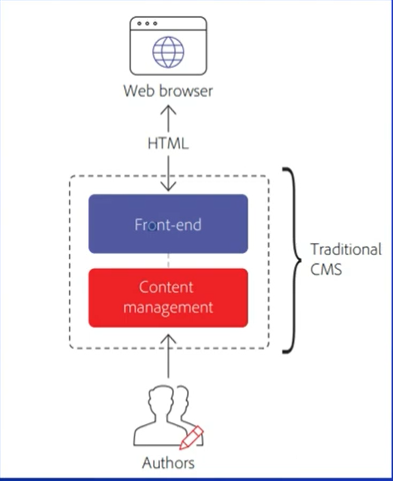
  • A traditional CMS, like WordPress, is an all-in-one system that provides the backend (where you manage the content) and the frontend (how the content gets displayed to the user in their browser). 
  • Traditional CMS platforms are designed in a way where the frontend and backend are tightly integrated.


Challenge with Traditional CMS
  • Reusability we will not be able to reuse the content across different channel or front-end.
  • Because Front-end and content management is bundled in a single system. 

Traditional categories in Two Parts
  1. Coupled CMS
    • When your logic your functionality is binded to your rendering framework that is called coupled CMS.
    • A coupled CMS enables users to create and edit content then make it live to end users through the frontend attached to the CMS.
    • The content authoring system and backend database are tightly coupled together.
    • WordPress and Drupal are excellent examples of a coupled CMS.
  2.Decoupled CMS
    • It is managed through Single CMS Platform.
    • Backend and Frontend is decoupled and integrated through API.
    • Backend and Frontend decoupled in different system.
    • for eg: WordPress, Drupal.
    • WYSIWYG editors or templates.


 Headless CMS
  • Offer the backend for content storage and management.
  • The result is a next-gen system built for flexibility and scalability.
  • The content is then accessible via a RESTful API or GraphQL API for display on any device.
  • Here, the "head" refers to the frontend—the part of the system that displays the content to users, including the website's layout, design, and user interface. and less means absence it means Frontend part is not available in Headless CMS.
  • So, we can use any frontend technology for eg:- React, Angular etc.
  • for eg: contentful, content stack.


Hybrid CMS
  • It provides Headless functionality as well as it behave as a  Traditional CMS.
  • The frontend can be separated the backend by an API.
  • It is combination of Frontend + Backend + API.
  • WYSIWYG editors or templates for enhanced authoring.
  • for eg: AEM, dotCMS.

Difference b/w Headless and Hybrid CMS


How AEM (Adobe Experience Manager) support Hybrid architecture? 


  • In a Headful or full stack model, the content is managed in the AEM repository and AEM components based on Java, HTL , etc .are used to render the content for the user experience.
  • In a headless model, the content is managed in the AEM repository but delivered via APIs such as REST API and GraphQl to another system to render the content for the user experience.
  • Delivers content either as fully formatted HTML or Json over the HTTP APIs.

Thanks 
Matri Sharma

Thursday, 21 September 2023

Java Application

Java Application

  • Using the Java programming language, we can create two main types of Java applications: standalone applications and Enterprise applications.
Standalone Applications

  • If we design and execute any java application without using client-server architecture than that java application is called as Standalone application.

  • Two types of Standalone application
  1. CUI Application (Characters User Interface)
  • It will be designed in such a way to take input data from users through command prompt and to provide output data to the user through the same command prompt, where the command prompt is acting as an user interface.
  • It is supporing characters data.

2.   GUI Application(Graphical User Interface)                         
  • It is standalone application, it will be designed such a way to take input from users through the collection of graphics component and to provide out data to the users through the same collection of graphics components.
  • It is supporting graphic data.
  • To prepare applications, java has provided some core libraries
  • i.e: java.lang, java.io, java.util, java.awt, javax.swing etc.

Enterprise Application
  • If we design execute any java application on the basis of client-server architecture or by distributing application logic over multiple machine then that java application is called as Enterprise Application.
Two types of Enterprise Application

  1. Web Application
  • It is a client-server application, where the complete application logic will be distributed over server machine.
  • In web Application client must be browser.
  • JVM is required for server side.


2.Distributed Application
  • Distributed application is a client-server application, where the complete application logic will be distributed over both client and server machine.
  • In Distributed application client may be a java program servlet, JSP Page framework, structs, spring application.
  • JVM is required for both client-server side.


Difference B/W Web Application and Distributed Application


What is the purpose of web application?
  • The purpose of web application is to provide dynamic response from server machine.
What is the purpose of Distributed application?
  • The purpose of distributed application is to establish communication b/w local machine & Remote machine services from Remote machine to local machine.

In Web application , there are Two types of Response
  1. Static Response
  • Static response is the response generated from service without executing any resource from server machine and without performing any action at server machine.

2. Dynamic Response
  • If we generate any resource from server by executing a particular resource or by performing an action at server machine than that response is called Dynamic Response.
  • To generate dynamic response server has to execute an application at server machine called as web application.
  • To prepare web applications at server we have to use a set of tech called as webTech.
  • for eg:- CGI, Servlets JSP etc.

Thanks
Matri Sharma

Monday, 18 September 2023

Query builder in AEM(Basic Structure)

  • If we talk about Search API in AEM there is Two main options available.
    • QueryBuilder
    • JCR SQL

  • What is Query Builder?
     The Query Builder in AEM is a framework and toolset that allows         developer and content authors to create and execute complex             queries to retrieve content from the AEM repository. It provides       a simple and efficient way to search for and access content based       on various criteria.                                              

  • How you can Write and execute Query Builder?
    There is a Console available in AEM where, we can write and test      our Query.
    Query Builder debugging tool allows you to interactively create,      test, and debug queries 
   URL :http://localhost:4502/libs/cq/search/content/querydebug.html 
  • Where does the Query Builder store data in the JCR.?
The data in the JCR is stored as a hierarchical structure of nodes and properties.
/libs/cq/search/content/querydebug

There is a console to test your query using this path http://localhost:4502/libs/cq/search/content/querydebug.html


  • When you write the query builder first you have to define what kind of node you want to search using as a generic term as a node you can define page, asset some any kind of node so whatever the primary type available in AEM you can search that any        available primary type so, first we have to define type.
  • In type we have to decide what you want to search suppose, I want to search pages so, the primary type of pages are cq:Page.


  • So, using this query we found all pages available in my repository .
  • But it's not right query total no of pages is 1750 but, it is showing only 10 pages name.
  • So, the solution is firstly we define the path and the path query is type=cq:Page


  • show 19 pages and the result is show 10 For change this behavior we can define One parameter i.e: p.limit.
  • p.limit can define how many results we want to search.
  • Basically, p.limit will be used when we implement Pagination.

  • for eg: we put p.limit=5, than Number of hits is 19, but results are 5.
  • If we want all results display than, we write p.limit=-1.
  • If we want some specific template so, let's see how we add any property and how we will search based on property.
  • property=cq:template and than, property.value= whatever the property of value.


  • AS soon as hit that search button the number of hits is 0. so, let's see what is the issue here.
  • We are trying to search cq:Page we are using node it means the page we should have a property so, if we go there in repository and check this node does have property called cq:template that is the reason result showing 0.
  • Let 's see how to resolve this problem if we see all the data store in jcr:content  and this has primary type cq:PageContent


  • In this Query might be missing some value than we are searching page not page content so keep type=cq:Page itself and search the relative path [It means properties on related path] It means /page there is a node jcr:content than we add relative path.

  • In each hit having a page rather than the page content.
  • If we want to search multiple of same property than using jcr:title.

  • Only single property we defining multiple value using property.1_value= title name.
  • By default it has or value if we want to make it end than, we are using propery.and=false by default it is false, if we make it true than the result is 0.
  • Because title does not have both 

  • Now we want to use multiple properties.
  • For multiple properties we are using prefix before properties rather than before value.

  • Suppose we want or condition it means either template is home or title is xml.
  • So, for that we have define groups


  • If there is no homepage template, why is the number of hits not 0? Let's see what the reason is
  • It is coming on search because the title is xml present.

  • How to know the data of each search result?
    • There is a option of JSON QueryBuilder Link click on this so, we will find in json what data is coming so it will giving all results. 


  • If we want order of these last modified date so we search orderby=@jcr:content/cq:lastModified


  • By default it is an ascending order.
  • If we want descending order so we search orderby.sort=desc.

Thanks
Matri sharma

Monday, 28 August 2023

System user or Service user & Resource Resolver

System User/Service User

  • System or service users in AEM are specific types of users designated to perform operations with minimal permissions within a particular bundle. Unlike regular users, they cannot log into AEM using typical credentials.
  • It means they have specific kinds of users with which you can't log into AEM using normal login credentials, as you would for regular users. They have minimal permissions, meaning they are granted only the necessary permissions to perform their designated operations, and they are always mapped to a particular bundle.
  • For example, if I have a resource that requires updating, specifically adding a particular property to it, I delegate this task to a service user that is associated with a specific bundle.
What is the need of System User/Service User?
  • In AEM 6.0, when you needed to update content or resources programmatically, In AEM 6.0, there were two primary methods to obtain the necessary session or resolver from the repository: 
  1. The administrative session 
  2. The administrative Resource Resolver.
  • Main Methods
    • Session session = SlingRepository.loginAdministrative();
    • ResourceResolver rr = resourceResolverFactory.getAdministrativeResourceResolver();

  • Two operations to get resource Resolver or session using repository you will get administrative session or administrative resource Resolver by using this two methods we will get administrative permissions
  • It means whole repository access that was breaking the principle of list privileges means 
  • If you have two main method session and Resource Resolver you could update whole repository.
  • because you had all permissions it means all access.

If you have two main method session and Resource Resolver you could update whole repository than How to resolve this kind of issue?

  • In order to address this issue, AEM introduced the concept of System User or Service User with version 6.1 .
How to create System user and How you can map those system user to a particular bundle?


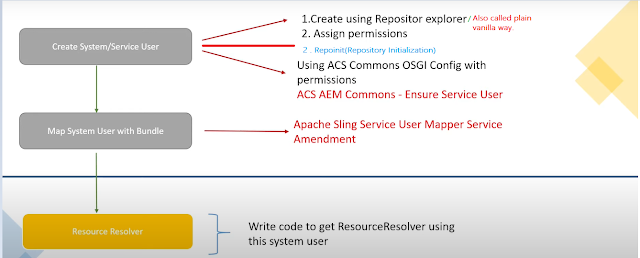
  1. Creating a system/service user can be done through three methods:
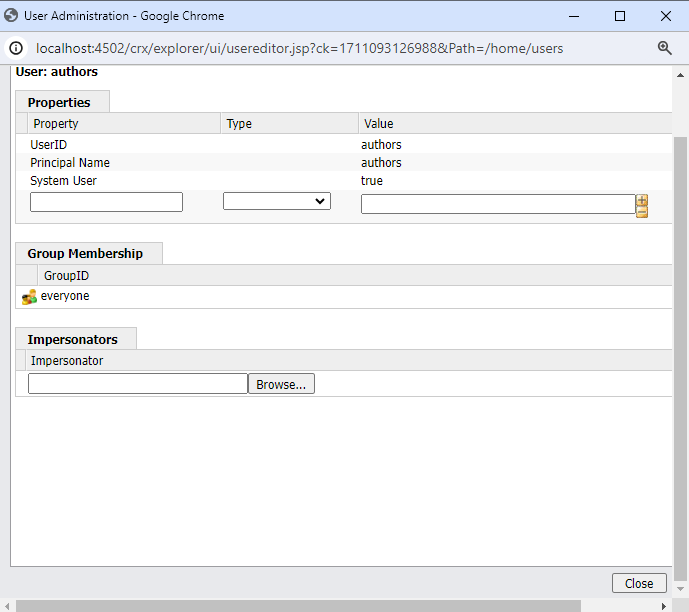
  • Using Repository Explorer, which is also referred to as the plain vanilla method.


For Login


After checking the green checkbox, click on "Close." Now, you have successfully created the system user.


Friday, 25 August 2023

Queue(Interface)

Queue


  • 1.5(v) enhancement of Queue(I).
  • It is the child Interface of Collection.
  • If we want to represent a group of individual objects Prior to Processing than we should go for Queue.
  • for eg: Before sending sms message all mobile no. we have to store all mobile no. in some data structure. In which order we added mobile no. in same order only message should be delivered for this FIFO requirement Queue is the best choice.
  • Usually Queue follows First In First Out [FIFO] order but based on our requirement we can implement our own Priority order also [Priority Queue].
  • From (1.5v) onwards LinkedList class also implements Queue Interface.
  • LinkedList based implementation of Queue always First In First Out [FIFO] order.
Queue Specific Method
  • boolean offer(Object o)
    • To add an object into the Queue.
    • Object peek()
      • To return head element of the queue. If Queue is empty than this method return Null.
    • Object element()
      • To return head element of the queue. If queue is empty than this method raise RE:NoSuchElementException.
    • Object poll()
      • To remove & return head element of the queue.If Queue is empty than this method return Null.
    • Object remove()
      • To remove & return head element of the queue. If queue is empty than this method raise RE:NoSuchElementException.
    For eg:

    Output :

    • q.peek() it returns head element of queue but if the queue is empty than it returns Null.
    For eg:


    output:

    • if we are calling q.element() or q.remove() of queue,if the queue is empty than it returns RE:NoSuchElementException.
    For eg:


    output:


    • poll() it means remove & returns head element of queue here 0 is the head element.
    • After remove head element 1 is the head element now output is 1,2,3...
    Priority Queue
    • If we want to represent a group of individual objects Prior to processing according to some priority than, we should go for PriorityQueue.
    • The priority can be either Default Natural Sorting or Customizer Sorting order defined by Comparator.
    • Insertion Order is not preserved & it is based on some priority.
    • Duplicate objects are not allowed.
    • If we are depending on Default Natural Sorting order compulsory the object should be Homogeneous & comparable otherwise we will get RE:ClassCastException.
    • If we are defining our own sorting by Comparator than objects need not be Homogeneous & Comparable.
    • Null is not allowed even as the first element also.
    Constructor
    • PriorityQueue q = new PriorityQueue();
      • Creates an empty priority with default intial capacity is 11. all object will be inserted according to Default Natural Sorting order.
      • PriorityQueue q = new PriorityQueue(int intialCapacity);
      • PriorityQueue q = new PriorityQueue(int intialCapacity Comparator);
      • PriorityQueue q = new PriorityQueue(SortedSet s);
      • PriorityQueue q = new PriorityQueue(Collection c);
      Note:
      • Some platform won't provide proper support for Thread priorities & priorityQueues.
      For eg of Customizer Sorting:


      output:


      Thanks
      Matri Sharma

      Tuesday, 22 August 2023

      Map Interface & Child classes of Map Interface(Part-2)

       Map Interface


      TreeMap
      • The underlying data structure is RED-BLACK tree.
      • Insertion order is not preserved & it is based on some sorting order of keys.
      • Duplicate keys are not allowed but values can be duplicated.
      • If we are depending on Default Natural Sorting Order than keys should be Homogeneous & comparable otherwise, we will get Run time exception saying class cache exception.
      • If we are defining our own sorting by Comparator than, keys need not be Homogeneous & comparable we can take Heterogeneous non comparable.
      • For Non-Empty TreeMap if we are trying to insert an entry with Nullkey than, we will get Run time Exception.
      • For Empty TreeMap as the 1st entry with Null key is allowed but, after inserting that entry if we are trying to insert any other entry than we will get Run time Exception.
      Note
      • The above Null Exception rule is applicable until(1.6v) only from (1.7v) onwards Null is not allowed for key.
      • But, for values we can use null any number of times there is no restriction whether, it is (1.6v)\(1.7v). 

      Constructor
      • TreeMap t = new TreeMap();
          For Default Natural Sorting of keys.
      • TreeMap t = new TreeMap(comparator c);
          For Customized Sorting.
      • TreeMap t = new TreeMap(m);
      • TreeMap t = new TreeMap(sortedMap m);
      For eg:

      output:


      • If we trying anything with null.
      for eg:

      output:
      • when we hit Heterogeneous key.
      • output is ClassCasteException.
      for eg:


      output:


      Hashtable
      • The underlying data structure for hashtable is Hashtable.
      • Insertion order is not preserved & it is based on HashCode keys.
      • Duplicate keys are not allowed & the values can be duplicated.
      • Heterogeneous objects are allowed for both key & value, otherwise we will get Run Time Exception saying Null pointer Exception.
      • It implements Serializable & cloneable interface but not Random Access.
      • Every method present in Hashtable is Synchronized & hence, Hashtable object is thread safe.
      • Hashtable is the best choice if our frequent operation is Search operation.
      Constructor
      • Hashtable h = new Hashtable();
           create an empty Hashtable object with default initial capacity       11 and default fill ratio is 0.75.
      • Hashtable h = new Hashtable(int intialCapacity);
      • Hashtable h = new Hashtable(int intialCapacity ,floatFillRatio);
      • Hashtable h = new Hashtable(map m);
      for eg:

      output:

      • If we trying anything with null.
      for eg:

      output :


      • If we configure initial capacity as 25. output is different.
      for eg:


      output:


      Properties
      • In our program if anything which changes frequently[for eg: User name, password, mailid, mobile no etc.] are not recommended to hard core in java program.
      • Because, if this is any change to reflect that change Recompilation, Rebuild, Redeploy application are required. Even sometime server restart also required, which creates a big business impact to the client.
      How can overcome of this problem? 
      • we can overcome this problem by using properties file. such type of variable things we have to configure in the properties file from that properties file we have to read into java program & we can use those properties.
      • The main advantage of this approach is:
      1. If there is a change in properties file to reflect that change just a redeployment is enough which won't create any business impact to the client. 
      2. We can use java properties to hold properties which are coming from properties file.
      3. In normal map [for eg: Hashtable, HashMap ,TreeMap etc.] key & value can be any type but in the case of properties key & value should be String Type.
      Constructor
      • Properties p = new Properties();
      Method of Properties
      • String setProperty(String pname, String pvalue)
                To Set a new property. If the specified property already             available than the old value will be replaced with new value         and return old value.
      • String getProperty(String pname)
             To get value associated with the specified property. If               specified properties than this method return Null.
      • Enumeration propertyNames()
      Another method
      • void load(InputStream is)
            To load properties from properties file into java properties          object.
      • void store(OutputStream os , String comment)
            To store properties from java properties object into 
            properties file.


      for eg:


      • This is properties file abc.properties.
      • without having properties file you can't expect any single java project.
      output:


      • Now let see what happened in properties file.


      •  If we change in file.
      for eg:


      • Some changes doing in password old password = Mohan new password = Mohan@123456*
      • Automatically changed in output after execution.
      output:


      • After execution password has been changed.


      Thanks
      Matri Sharma

      Extending AEM Components Using sling:resourceSuperType — Powered by Sling Resource Merger

      Quote's of the day "You never fail until you stop trying" What is Sling Resource Merger ?   Sling Resource Merger is the hidd...